ComScore and Omniture Partner Up for Digital Audience Measurement Service
Less than a week after being acquired by Adobe, Omniture is partnering with comScore to provide a digital audience measurement service. Specifically, Omniture's Web analytics will be paired up with comScore's new Media Metrix 360 hybrid audience measurement to provide intelligence for media planning.
"Since the rise of digital advertising, advertisers and publishers alike have sought ways to reconcile their Web analytics and panel-based measurement data to establish a unified measure of online audiences," said Josh James, Omniture CEO and co-founder.
The new partnership aims to be that long sought-after reconciliation. It also aims to spur the progress of digital advertising.
"This relationship will deliver to our customers the solution that they have been seeking, thus helping to promote and accelerate the usage of digital marketing intelligence for delivering actionable business results and competitive advantage. We believe it will also help the industry overcome concerns of inconsistent measurement of digital audiences and promote further adoption of digital media advertising,"said Dr. Magid Abraham, comScore President & CEO.
2009-09-21
comScore and Omniture Partner Up for Digital Audience Measurement Service
Google Launches the DoubleClick Ad Exchange
Google Launches the DoubleClick Ad Exchange:
Finally after acquiring Double Click for a whooping $3.1 billion, Google will now try to regain what they’ve invested in the company. The Official Google Blog has just announced the launch of the Double Click Ad Exchange – a real-time marketplace to buy and sell display advertising.
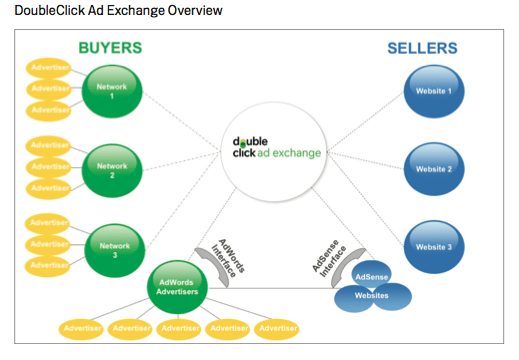
The DoubleClick Ad Exchange hopes to achieve what Google AdWords and Google AdSense have achieved so far. With it, Google hopes to create more open display ad ecosystem for everyone. The ecosystem we’re talking about here consists of Ad Exchange Sellers and Buyers, Google AdWords Advertisers and Google AdSense Publishers.
The DoubleClick Ad Exchange would benefit these four players, and so Google said. For Ad Exchange Buyers, the display ad marketplace will give them access to more websites and ad spaces, as well as bid for ad space in real-time. For Ad Exchange Sellers this program would mean more advertisers and more revenues for their ad spaces. Google AdWords advertisers are also to benefit from the DoubleClick Ad Exchange through easy access to the many websites in the Ad Exchange in addition to the websites in Google’s Content Network. While Google AdSense publishers will have their ad spaces exposed to more certified ad networks in the Ad Exchange. Both AdWords and AdSense members can enjoy the DoubleClick Ad Exchange through their respective interfaces and don’t need them to get through the DoubleClick Ad Exchange.
So, if you’re a Google AdSense publisher you can check out how the DoubleClick Ad Exchange will affect you at the Inside AdSense blog. If you’re a Google AdWords advertiser, this is the link that you would want to check out.
Other details about the DoubleClick Ad Exchange are enumerated on this PDF file and also at the Double Click Blog.
SEO Automatic Tool: Now for the iPhone
SEO Automatic Tool: Now for the iPhone:
I’ve had the opportunity to check out by SEO Automatic’s iPhone app by Scott Hendison of Search Commander, Inc. The app is the full version of SEO Automatic, an SEO site audit tool, just made for the iPhone. The only difference is the descriptions and recommendations is slightly less verbose to fit it on a mobile window.
The app is lightning fast and analyzes your site in just a few seconds, despite it’s screen that says “This may take a minute or two.” It immediately gives you an overview of notable issues, issues worth reviewing, and stuff you are doing correctly. SEO Automatic gives great advice.
Despite being less verbose than the Website version, it is still highly text-heavy for an iPhone. It’d also be nice to see a feature that allows you to email yourself the results so you can read the results on your computer too. I guess that’d defeat the purpose of buying the Web version though!?

Big Brands & Social Media Part 3 – Putting The Plan Into Action
Big Brands & Social Media Part 3 – Putting The Plan Into Action
After my last column on how big brands should organize around social media marketing, I thought it might be useful to get tactical and look at some specific ways that big brands can begin to move the needle on social media. Again, I’m crediting Bill Hunt with inspiring some of these thoughts in a great presentation he gave here at Yahoo! last month, as well as Laura Lippay for leading the charge internally at Yahoo!.
Get the basics right
Like most things I experience here at Yahoo! that hold true for large companies, I find that we need to focus on doing some very basic things across a vast scope and scale. The same holds true for social media marketing. Focusing on a very few, important efforts and doing them well across the company represents success for us and all big brands. So let’s isolate a couple topics and make sure we get them right.
Push all the right buttons
First, enable your site to support social media. Enable your users to join your network and promote your content. Your site needs links or buttons to follow the brand or product on Twitter and Facebook at the very least. Of course, if you have many products, like most big brands, you’ll need to point to different Twitter streams or Facebook pages that are appropriate to the respective product or service. As well, if you produce content on your site, at the end of your articles you’ll want buttons that promote your content to sites like Digg, Reddit, and Yahoo! Buzz. Getting these buttons on your site will take some time and effort, not because the work is difficult, but because the folks who do the work will have many other priorities in their queue. At this point, you will need to rely on your previous work in creating a center of excellence (CoE), working with an executive sponsor to get the work prioritized.
A cast of thousands
Once your site is enabled for social media, you will want to rely on your company’s biggest asset: your employees. One of the nice things about big brands is that we employ large numbers of people who are brand evangelists. That means that at Yahoo! and other companies, there are thousands of potential marketers for our products and services. If we all spend just a few minutes a day talking up our products and services to our respective social communities, the effect will be significant.
With social media, however, we need to be careful how we behave. Social media networks are fragile when it comes to commercial promotion. If your network thinks you are spamming them with commercial messages, they will likely ignore you and you will lose credibility within your network. Right now, the conventional wisdom is that it’s OK to talk about your products within your social network, but this should generally be done in the spirit of conversation. That is, when Yahoo! launches its new homepage, it’s acceptable to post a link to it on my Facebook page and say “Hey everybody, what do you think about the new Yahoo! homepage?” In contradistinction to this, it is generally frowned upon to promote your own products and services through some of the main social channels such as Digg, Reddit, and Yahoo! Buzz. For example, if Yahoo! sports just broke a story about Shawne Merriman and Tila Tequila, I shouldn’t Digg it through my own account. However, it’s OK to share the story with my social network and invite others to “buzz it up.” You can imagine that if all my fellow Yahoos worked in this way we could really start to move the needle on our social media efforts.
Get your social social on
Another great way to increase awareness and share best practices internally is to schedule small, informal meetings with the folks in your organization who are really interested in social media. We came up with some interesting ideas around this in our SEO and Social Media Conference in Santa Monica last month. Having lunch, brainstorming with other Yahoos, we developed a formula for putting this into practice. We’re calling it a “Social Social” and we’re scheduling our first one next month, thanks to Laura Lippay. The idea is that we can have a small, targeted gathering where we can swap war stories and share strategies around social media. The goal is to make sure we’re executing in effective ways around the organization. The recipe is simple: Invite a small number of social media types. Pick a topic. Open with a Pecha Kucha. Add beer. Rinse and repeat.
Microsoft Bing Search Ads To Test Favicons:
Microsoft Bing Search Ads To Test Favicons
MediaPost reports Microsoft adCenter, Bing’s search ads, will be testing placing favicons and logos in the search ads. I have conducted about 20 queries to try to bring up such an ad, but I personally do not see them myself.
MediaPost wrote, “James Colborn, director at Microsoft Advertising and long-time adCenter veteran, believes the market is ready to experiment with more creative options. These options stray from standard text ads in search. Consumers next year will start to see a richer ad experience in search results, he says.”
Yahoo has tested favicons in search ads in the past, as did Google with favicons in AdWords and favicons in organic results.
These days, you often don’t see favicons in the Google results, but you do occasionally see them in the Yahoo search ads.
If you do see them in adCenter (Bing Search Ads) do let us know.
Google: Stop Suing Over The Meta Keywords Tag, We Don’t Use It:
Google Stop Suing Over The Meta Keywords Tag, We Don’t Use It:
Google is telling the world what every seasoned webmaster and search marketer should already know: The keywords meta tag has no impact whatsoever on how Google’s search engine ranks pages. None. Zilch. Nada. And while Google often needs to be somewhat ambiguous when talking about how it ranks pages, the message in today’s blog post is perfectly clear:
“Our web search (the well-known search at Google.com that hundreds of millions of people use each day) disregards keyword metatags completely. They simply don’t have any effect in our search ranking at present.”
Google’s blog post also talks about an imagined clash between two web site owners, Bob and Alice, over Bob’s use of Alice’s business name in his keywords tag and copying of other words from her keywords tag. Although Google doesn’t mention actual companies and doesn’t reference a specific lawsuit, the video that accompanies the blog post does mention lawsuits that involve the keywords tag and Google’s search rankings. About the keywords meta tag, Matt Cutts says:
“It’s really not worth suing someone over because, at least for Google, we don’t use that information in our rankings even the least little bit.”
If this is a case of Google offering information in relation to a legal case, it’s not the first time. Back in 2006, Matt Cutts wrote a post on his blog confirming that an SEO company and its clients had been banned from Google’s index. At the time, well-known SEO Aaron Wall was being sued by the SEO company that had been banned, and Matt’s blog post refuted some of the SEO company’s claims.
Back to the keywords tag: It’s worth mentioning that Google’s webmaster help has an entire page about meta tags and the word “keyword” doesn’t appear on it once. And as long as we’re clearing up some SEO basics, I’ll also note that Google’s blog post confirms that the meta description tag is also not used for ranking pages. If you want even more, see our in-depth post, Meta Keywords Tag 101: How To “Legally” Hide Words On Your Pages For Search Engines (which among other things documented how Google does NOT use the meta keywords tag).
Google’s Indexer
Google’s Indexer:
Googlebot gives the indexer the full text of the pages it finds. These pages are stored in Google’s index database. This index is sorted alphabetically by search term, with each index entry storing a list of documents in which the term appears and the location within the text where it occurs. This data structure allows rapid access to documents that contain user query terms.
To improve search performance, Google ignores (doesn’t index) common words called stop words (such as the, is, on, or, of, how, why, as well as certain single digits and single letters). Stop words are so common that they do little to narrow a search, and therefore they can safely be discarded. The indexer also ignores some punctuation and multiple spaces, as well as converting all letters to lowercase, to improve Google’s performance.
Google’s Query Processor
The query processor has several parts, including the user interface (search box), the “engine” that evaluates queries and matches them to relevant documents, and the results formatter.
PageRank is Google’s system for ranking web pages. A page with a higher PageRank is deemed more important and is more likely to be listed above a page with a lower PageRank.
Google considers over a hundred factors in computing a PageRank and determining which documents are most relevant to a query, including the popularity of the page, the position and size of the search terms within the page, and the proximity of the search terms to one another on the page. A patent application discusses other factors that Google considers when ranking a page. Visit SEOmoz.org’s report for an interpretation of the concepts and the practical applications contained in Google’s patent application.
Google also applies machine-learning techniques to improve its performance automatically by learning relationships and associations within the stored data. For example, the spelling-correcting system uses such techniques to figure out likely alternative spellings. Google closely guards the formulas it uses to calculate relevance; they’re tweaked to improve quality and performance, and to outwit the latest devious techniques used by spammers.
Indexing the full text of the web allows Google to go beyond simply matching single search terms. Google gives more priority to pages that have search terms near each other and in the same order as the query. Google can also match multi-word phrases and sentences. Since Google indexes HTML code in addition to the text on the page, users can restrict searches on the basis of where query words appear, e.g., in the title, in the URL, in the body, and in links to the page, options offered by Google’s Advanced Search Form and Using Search Operators (Advanced Operators).
Googlebot, Crawler
Googlebot, Crawler:
Googlebot is Google’s web crawling robot, which finds and retrieves pages on the web and hands them off to the Google indexer. It’s easy to imagine Googlebot as a little spider scurrying across the strands of cyberspace, but in reality Googlebot doesn’t traverse the web at all. It functions much like your web browser, by sending a request to a web server for a web page, downloading the entire page, then handing it off to Google’s indexer.
Googlebot consists of many computers requesting and fetching pages much more quickly than you can with your web browser. In fact, Googlebot can request thousands of different pages simultaneously. To avoid overwhelming web servers, or crowding out requests from human users, Googlebot deliberately makes requests of each individual web server more slowly than it’s capable of doing.
Googlebot finds pages in two ways: through an add URL form, www.google.com/addurl.html, and through finding links by crawling the web.
Unfortunately, spammers figured out how to create automated bots that bombarded the add URL form with millions of URLs pointing to commercial propaganda. Google rejects those URLs submitted through its Add URL form that it suspects are trying to deceive users by employing tactics such as including hidden text or links on a page, stuffing a page with irrelevant words, cloaking (aka bait and switch), using sneaky redirects, creating doorways, domains, or sub-domains with substantially similar content, sending automated queries to Google, and linking to bad neighbors. So now the Add URL form also has a test: it displays some squiggly letters designed to fool automated “letter-guessers”; it asks you to enter the letters you see — something like an eye-chart test to stop spambots.
When Googlebot fetches a page, it culls all the links appearing on the page and adds them to a queue for subsequent crawling. Googlebot tends to encounter little spam because most web authors link only to what they believe are high-quality pages. By harvesting links from every page it encounters, Googlebot can quickly build a list of links that can cover broad reaches of the web. This technique, known as deep crawling, also allows Googlebot to probe deep within individual sites. Because of their massive scale, deep crawls can reach almost every page in the web. Because the web is vast, this can take some time, so some pages may be crawled only once a month.
Although its function is simple, Googlebot must be programmed to handle several challenges. First, since Googlebot sends out simultaneous requests for thousands of pages, the queue of “visit soon” URLs must be constantly examined and compared with URLs already in Google’s index. Duplicates in the queue must be eliminated to prevent Googlebot from fetching the same page again. Googlebot must determine how often to revisit a page. On the one hand, it’s a waste of resources to re-index an unchanged page. On the other hand, Google wants to re-index changed pages to deliver up-to-date results.
To keep the index current, Google continuously recrawls popular frequently changing web pages at a rate roughly proportional to how often the pages change. Such crawls keep an index current and are known as fresh crawls. Newspaper pages are downloaded daily, pages with stock quotes are downloaded much more frequently. Of course, fresh crawls return fewer pages than the deep crawl. The combination of the two types of crawls allows Google to both make efficient use of its resources and keep its index reasonably current.
